Python - make Metastock display ShareInvestor historical data as names instead of symbols
I am new to Python and have decided to learn this language.
The last time I learn a language is in my university day which is 40 years ago. Now with almost any information can be obtained from the internet and Youtube, I decided to embark on this journey.
What better to start the journey by writing a program I can use.
Problem:
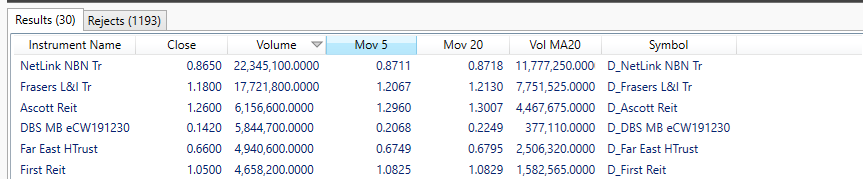
ShareInvestor.com provide historical data download.The problem is when I use MetaStock, somehow MetaStock only display the symbol and not the stock name. This cause a problem when I do exploring as the nanme is not reflected and it take time for me to trace what stock does the symbol represent.
I spent two days (about a total of 5 hours) to come out with the script below:
and it works...

Next will be automate the extraction of the historical file daily...
See you next time...
The last time I learn a language is in my university day which is 40 years ago. Now with almost any information can be obtained from the internet and Youtube, I decided to embark on this journey.
What better to start the journey by writing a program I can use.
Problem:
ShareInvestor.com provide historical data download.The problem is when I use MetaStock, somehow MetaStock only display the symbol and not the stock name. This cause a problem when I do exploring as the nanme is not reflected and it take time for me to trace what stock does the symbol represent.
I spent two days (about a total of 5 hours) to come out with the script below:
#_*_ coding : UTF-8 _*_# coder    : MK Yuen# code time: 06-Aug-19 11:30 AM# file name: Read all files in shareinvestor.PY# Py ver   : PyCharm
# the problem with shareinvestor data is that the ticker symbol is being read by MS to be the name of the share# as a result, when we run explorer, we get a list of symbols which we need to refer before we know the stock# this is time consuming
# for this program, i use os to join path, I believe I can simply use string to do it, but I did not try# glob is needed to limit the files to csv files though I do not think there are any other files in the folder# csv is used for reading and writing the csv file
# first I define the fields to be used and the field to be replacedimport time
import os
import glob
import csv
start = time.time()
folder_path = 'C:\Metastock Data\ShareInvestor Local Data'key_to_be_replace = 'ticker'key_to_be_duplicated = 'name'
# loop through all files with .csvfor filename in glob.glob(os.path.join(folder_path, '*.csv')):
    # open the file first    with open(filename,  'r') as f:
        # actually do i still need variable reader, can i use info_list  list(csv.reader(f) ?        # change the csv file into a list        reader = csv.reader(f)
        info_list = list(reader)
        # the purpose is to skip the field row in the csv, alternatively i can use a boolean variable        counter = 0        for row in info_list:
            if counter != 0:
                info_list[counter][0] = info_list[counter][1]
                counter +=1            else:
                counter +=1        f.close()
    # newline is essential, otherwise writer will generate a blank line    with open(filename, 'w',newline='') as writeFile:
        # make the file to be ready for csv write        writer = csv.writer(writeFile)
        # write each row of list into csv file, note that the method is writerows() not writerow()        writer.writerows(info_list)
    writeFile.close()
    # this is to provide user info on status of write    print(filename)
end = time.time()
print ("Time for execution is ", end - start, "seconds")
and it works...
Next will be automate the extraction of the historical file daily...
See you next time...


Comments
Post a Comment